Platform
Meters, contracts, faults and invoices in one system.
The platform brings the work of energy management together in seven module groups.
Start without replacing your existing systems.
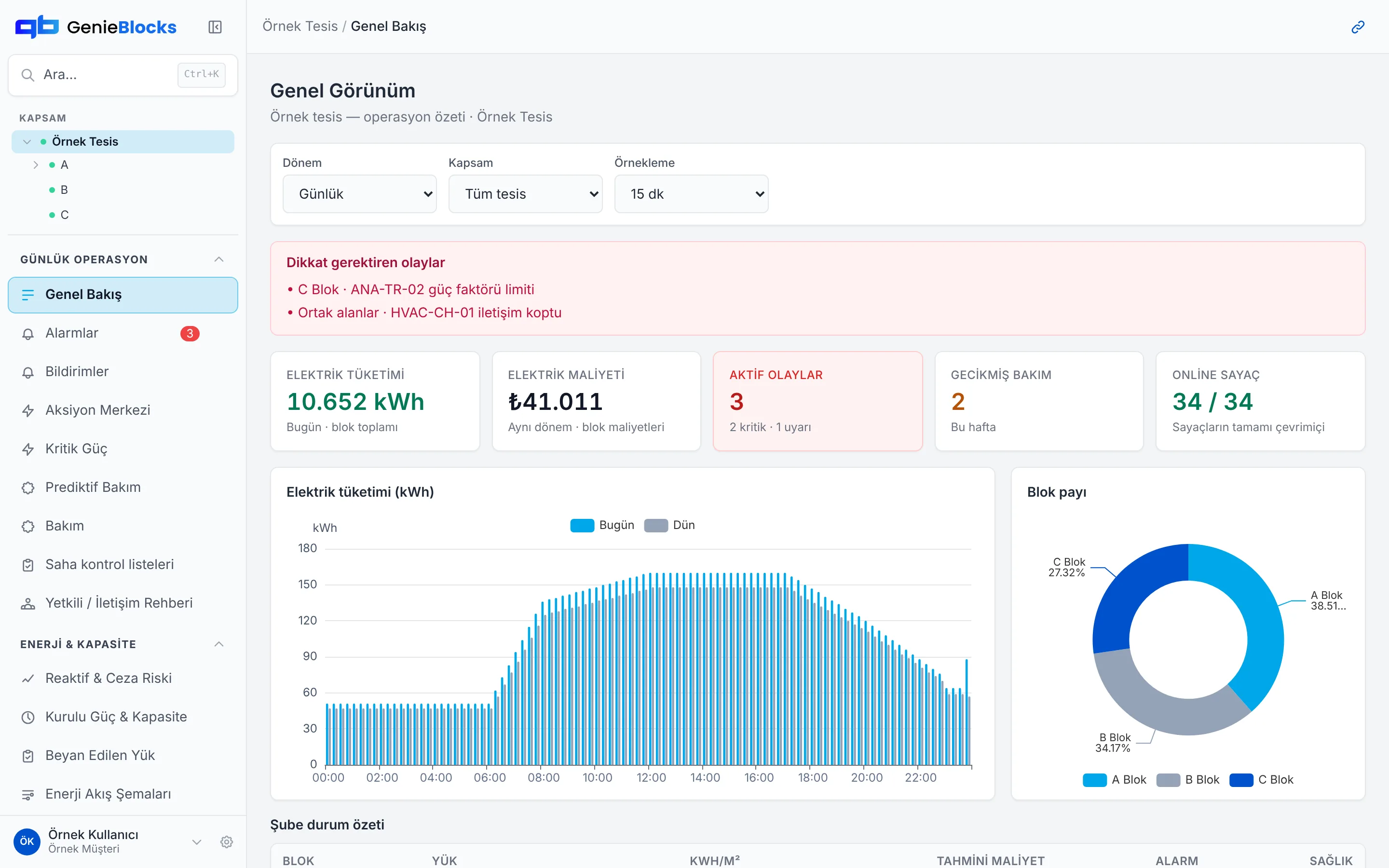
Images use Sample Site data.
One data backbone
Data comes in once and every module uses the same record. Adding a module is not installing new software; it opens a new screen on the same data.
Sources
- OSOS
- Modbus (RTU / TCP)
- LoRaWAN
- REST API
- Invoices and spreadsheets
Data backbone
- Site
- Building
- Meter
- Tenant
- Contract
- Asset
Module groups
- Daily Operations
- Energy & Capacity
- Analytics & Reporting
- Decision Support
- Assets & Tenants
- Training
- System
Who uses it
- Teams, with role-based screens
- Genie: suggests, you approve
- External systems: REST API, MCP
Building blocks for your site.
Each layer is a block; all of them sit on the same data backbone. Pick a layer to see what it does. See the data backbone
The step marked coming soon is a roadmap item. Timing and scope may change; this is not a commitment.
Meters, OSOS and field devices flow into one data backbone.
OSOS, Modbus, LoRaWAN, REST API, MCP
Consumption, cost and meter status by block, site and tenant, at 15-minute resolution.
Overview, Deep Analytics, Installed Power & Capacity
Reactive limits, lost communication, overdue maintenance: problems show up before they become a bill or a breakdown.
Alarms, Reactive Power & Penalty Risk, Invoice Tracking, Predictive Maintenance
From alarm to work order, from work order to field checklist. Who did what and when is on record.
Action Center, Maintenance, Field Checklists, Contact Directory
Ask the modules in your own words. Genie answers and brings the action as a draft; it asks for your approval before applying it.
Genie AI Agent, voice and camera on the phone shown in our demo
Role agents that Genie manages; each takes a job from start to finish, within approved limits.
Role agents
- OSOS
- 34 metersConnected
- Modbus TCP
- 8 devicesConnected
- LoRaWAN
- 12 devicesConnected
- Consumption
- 2,910 kWh
- Cost
- ₺11,204
- Meters
- 12 / 12Online
- Block C
- Power factor limitCritical
- Common areas
- HVAC communication lostCritical
- Maintenance
- 2 jobs overdueWarning
- Subject
- Compensation panel
- Assigned to
- Technical team
- Status
- DraftAwaiting approval
- Question
- Why did this month’s bill go up?
- Answer
- Night-time consumption is high in Block C
- Suggestion
- Check the HVAC scheduleDraft
- Job
- Finding the reactive cause (Detective)
- Limit
- Draft work orders only
- Approval
- For every actionComing soon
Work kept in separate places, on one platform
Today every job lives in a different file or tool. In GenieBlocks they all run on the same data.
| Where it usually is today | In GenieBlocks |
|---|---|
| Invoices in email and on the distribution company’s portal | Invoice Tracking · Supply Contracts |
| Consumption in a spreadsheet at month end | Overview · Deep Analytics |
| Tenant shares calculated by hand | Tenant Billing · Common Area Allocation |
| Faults in a messaging group, contacts in a phone book | Alarms · Contact Directory |
| Maintenance on paper checklists | Maintenance · Field Checklists |
| The single-line diagram in a folder somewhere | Electrical Drawings |
| The compliance report in a Word file | Reports · Energy Baseline |
| The carbon calculation with an outside consultant or in a spreadsheet | Carbon & Sustainability |
| OSOS data in a separate monitoring tool | Overview · Deep Analytics |
Modules
Modules on the site. Filter by group.
Overview
Daily summary of the site, consumption and open events on one screen.
My Office
Tenants see their own office's consumption and comfort, and no one else's.
Site Map
Temperature, occupancy, electricity and water layers on a block plan.
Alarms
Open and closed alarm events; an alarm is the start of a workflow.
Notifications
Notifications sent to the user in a single inbox.
Comfort
Office temperature, occupancy and air-conditioning setpoint.
Action Center
Drafts awaiting approval and completed actions.
Critical Power
UPS load, generator tests and critical power health.
Predictive Maintenance
Equipment with a falling health score, and predictive maintenance.
Maintenance
Maintenance plans and work orders.
Field Checklists
Checklists completed in the field.
Contact Directory
Who to call when something fails.
Reactive Power & Penalty Risk
Power factor, compensation threshold and likely penalty.
Installed Power & Capacity
Allocated power, peak demand and night-time base load.
Declared Load
A tenant's declared load compared with measured demand.
Energy Flow Diagrams
Energy flow from the transformer to the point of consumption.
Energy Optimization
Savings recommendations and estimated gains.
Energy Baseline
Deviation of consumption from the baseline period.
Deep Analytics
Analysis of 15-minute power, temperature and occupancy.
Reports
Ready-made energy reports.
Carbon & Sustainability
Scope 2 location-based and market-based emissions.
Savings Score
Savings score and targets.
Invoice Tracking
Tracking and checking the invoices issued to the site.
Tenant Billing
Energy invoices issued to tenants.
Common Area Allocation
Allocating common area consumption to tenants.
Supply Contracts
Supply contract and tariff tracking.
Device ROI
Payback period of an equipment investment.
Device Comparison
Consumption comparison of devices of the same make and model.
Data Quality
Tracking of missing data and offline meters.
Tenants
Tenants, their offices and consumption shares.
Buildings
Building and block identity, location and consumption.
Equipment Inventory
Devices in the inventory and their consumption.
Metering Points
Catalogue of meters and metering points.
Device Mapping
Mapping a field device to a metering point.
Meter Replacement Log
Serial number and reason for each replaced meter.
Electrical Drawings
Single-line diagrams and electrical project documents.
Savings Training
Savings training content for tenants and field teams.
Genie AI Agent
An AI agent that makes recommendations and works with approval.
MCP Integration
The platform opens up to external AI tools such as Claude through MCP.
Users & Roles
Role-based access; a tenant sees only their own data.
In development
These capabilities are in development. Timing and scope may change; this is not a commitment.
Water module
Coming soonGas module
Coming soonHeat module
Coming soonISO 50001 outputs (EnPI, baseline, audit evidence)
Coming soonRole agents
Coming soon
Integrations
The platform is hardware-agnostic. Today it takes data from:
- OSOS
- Modbus (RTU / TCP)
- LoRaWAN
- REST API
- MCP
Connected in the setup project: M-Bus · IEC 62056-21 · RS-485 · Pulse output · Analogue (4-20 mA, 0-10 V) · MQTT · Databases on your own servers
If your device isn't listed, we add it together.
GenieBlocks hardware is optional; you don’t need it to get started. Explore our hardware
Delivery models
The platform runs in two ways; payment is by annual licence or monthly subscription. What pricing is based on is explained on the How we work page.
On-prem
The platform runs on your own servers.
Cloud
We run the platform; no servers needed on your side.
Which modules fit you?
Tell us about your site and your priorities; we’ll choose the right modules together.