By problem · Invoices and savings
Why is your bill high?
By the time the bill arrives the work is usually done: it gets paid and nobody asks why it is high. GenieBlocks checks the invoice against the contract and the meter, shows where the high line comes from and warns you before the next bill.
Short answer
The invoice, the contract and the meter reading are compared in one place. A gap or a penalty line becomes a warning before the bill is issued.
Today and on GenieBlocks
| Today | On GenieBlocks |
|---|---|
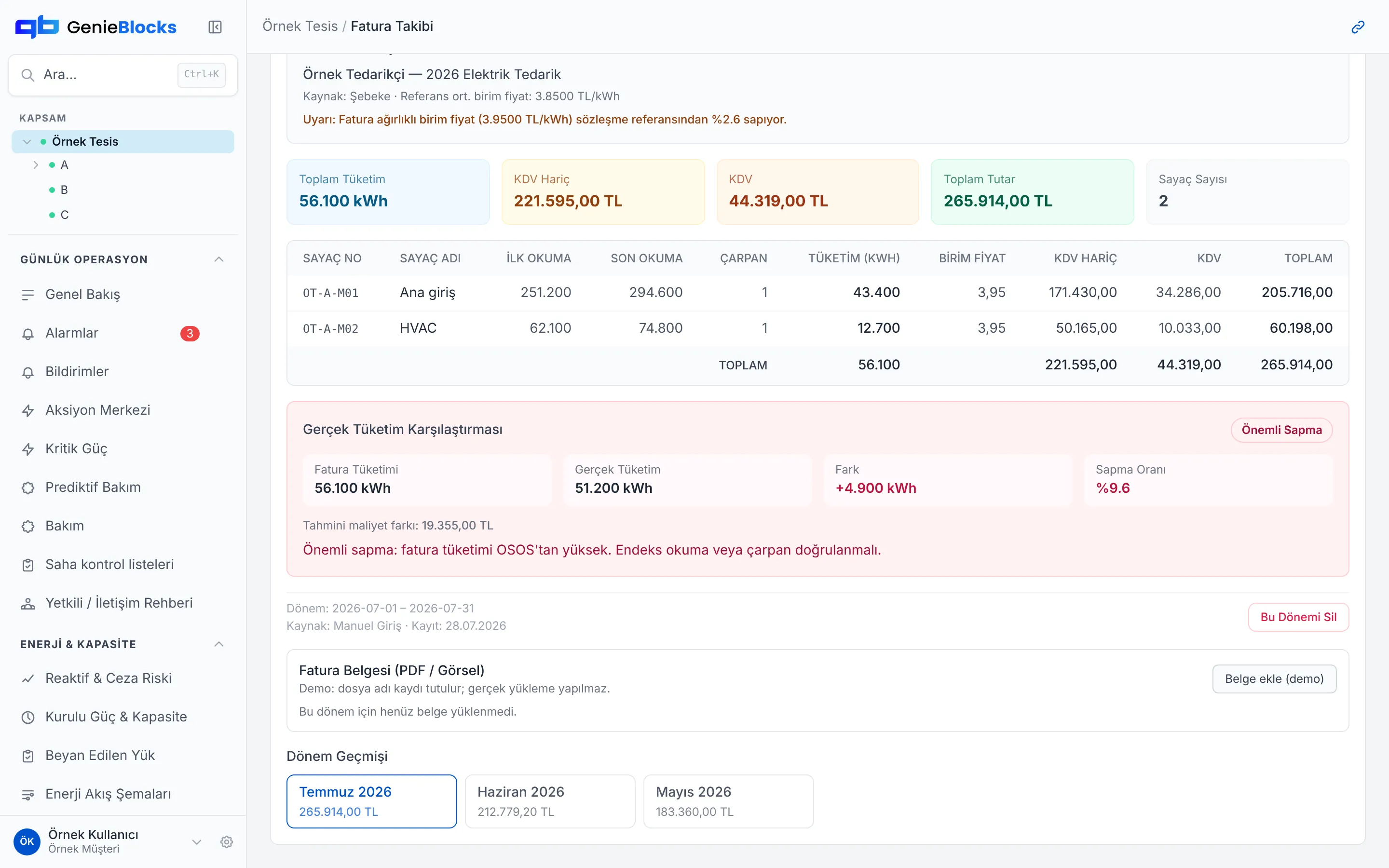
| The bill is paid and not checked against the meter. A reading or multiplier error goes unnoticed unless someone looks. | Invoice Tracking compares each period with the contract unit price and metered consumption; a gap becomes a warning. |
| Reactive charges and demand overruns are seen when they already appear on the bill. | Reactive ratio and demand are monitored. Nearing the limit raises an alarm and a draft work order; applying it waits for your approval. |
| Site bills sit in separate files, so similar sites are not compared. | Sites are compared with their own baseline and with their peers; the outlier stands out. |
How we solve it
We check the invoice against measurement
Every period invoice is compared with the contract unit price and with metered consumption; deviations become warnings.
We show the penalty in advance
Reactive ratios and demand are monitored continuously; nearing the limit triggers an alarm and a draft work order.
We compare sites on the same basis
Sites and blocks are compared with their own baseline and with their peers; the outlier stands out.
How the platform addresses them
The modules that map to these problems. All modules run on one data backbone, in the same interface.
Invoice Tracking
Tracking and checking the invoices issued to the site.
Supply Contracts
Supply contract and tariff tracking.
Reactive Power & Penalty Risk
Power factor, compensation threshold and likely penalty.
Installed Power & Capacity
Allocated power, peak demand and night-time base load.
Energy Baseline
Deviation of consumption from the baseline period.
Device Comparison
Consumption comparison of devices of the same make and model.
Related capabilities
AMR/OSOS (automatic meter reading)
Where the data comes from
You start without replacing your existing systems. Today the platform takes data from:
- OSOS
- Modbus (RTU / TCP)
- LoRaWAN
- REST API
Connected in the setup project: M-Bus · IEC 62056-21 · RS-485 · Pulse output · Analogue (4-20 mA, 0-10 V) · MQTT · Databases on your own servers
If your device isn't listed, we add it together.
Common questions
Who checks the invoice?
The platform compares the invoice with the contract and the meter. A gap becomes a warning. If Genie suggests an action, it arrives as a draft and you approve it.
Can I see a reactive charge before the bill?
The reactive ratio is monitored continuously. Nearing the limit raises an alarm. This page does not calculate the charge.
Can I start without uploading a file?
Meter data connects through OSOS, Modbus, LoRaWAN or REST. Which link fits is settled in the installation, from the metering you already have.
Let’s talk about your facility
Join the early access list; in the demo we show the platform and work out together how to start with the meters and systems you already have.